

Table of Contents
- Quick Comparison: Best Innovative Smart Home Gadgets 2026
- Smart Home Automation Trends 2026: What's Actually Changing
- 1. ROJECO Automatic Cat Feeder: Portion Control Without the Guesswork
- 2. Foldable 3-in-1 Wireless Charging Station: One Dock, Three Devices
- 3. AI Chatbot Voice Assistant: A Smart Speaker That Reads the Room
- 4. Smart Robot Camera: 360° Coverage for Renters and Homeowners
- 5. Smart WiFi Doorbell: See Who's There Without Opening the Door
- 6. R10 Smart Ring: Health Tracking Without the Subscription
- How to Build a Smart Home Ecosystem That Doesn't Fall Apart
- Frequently Asked Questions
Last Updated: September 16, 2026
Quick Comparison: Best Innovative Smart Home Gadgets 2026
The best innovative smart home gadgets 2026 buyers are hunting for solve one specific problem each, and they solve it without a monthly fee. This guide from NextGen breaks down six devices worth your money, what each one actually does, and where it falls short.
Quick Picks:
- Best for Pet Owners: ROJECO Automatic Cat Feeder ($75), scheduled portions, app control, no subscription
- Best Desk Upgrade: Foldable 3-in-1 Wireless Charging Station ($14), charges phone, watch, and earbuds at once
- Best Voice Companion: AI Chatbot Voice Assistant ($32), emotion recognition and multilingual support
- Best Security Value: Smart WiFi Doorbell ($22), 1080p video, two-way talk, six-month standby
| Gadget | Price | Key Spec | Best For | Subscription |
|---|---|---|---|---|
| ROJECO Automatic Cat Feeder | $75.00 | 4L, 10 meals/day | Pet owners | None |
| Foldable 3-in-1 Charging Station | $14.00 | 15W, dual coil | Desk organization | None |
| AI Chatbot Voice Assistant | $32.00 | Multilingual, emotion recognition | Companionship | None |
| Smart Robot Camera | $35.00 | 3MP, 350° pan | Rental security | None |
| Smart WiFi Doorbell | $22.00 | 1080p, 6-month battery | Entry monitoring | None |
| R10 Smart Ring | $37.00 | Heart rate, SpO2, sleep | Health tracking | None |
Smart Home Automation Trends 2026: What's Actually Changing
The biggest shift in smart home automation trends 2026 is the retreat from subscriptions. Buyers who spent years paying monthly fees for camera storage and health data are now prioritizing devices that work fully offline or with local storage.

Interoperability matters more than ever. A gadget that only talks to its own app creates a dead end. Devices that support standard wireless protocols and Matter compatibility slot into a broader ecosystem instead of becoming orphaned hardware.
Three practical trends define this year:
- Local control over cloud dependence. Cameras with TF card storage keep footage on-device, avoiding recurring cloud fees and reducing data-privacy exposure.
- Firmware lifecycle awareness. Shoppers now check whether a manufacturer pushes firmware updates before buying, since abandoned devices lose features and security patches.
- Accessibility-first design. Larger displays, voice-assistant integration, and app-based control make devices usable for seniors and people with limited mobility.
CTA smart home research and standards guidance
1. ROJECO Automatic Cat Feeder: Portion Control Without the Guesswork
The ROJECO Automatic Cat Feeder handles the hardest part of pet ownership: consistent feeding when you're stuck at work or traveling. It holds 4 liters of dry kibble, enough for roughly two to three weeks for a small or medium pet.
Setup runs through the ROJECO app over 2.4GHz WiFi. You schedule up to 10 meals per day, with up to 60 portions per meal at about 6 grams each. The LCD display shows status at a glance, and a manual feed button dispenses a portion on demand.
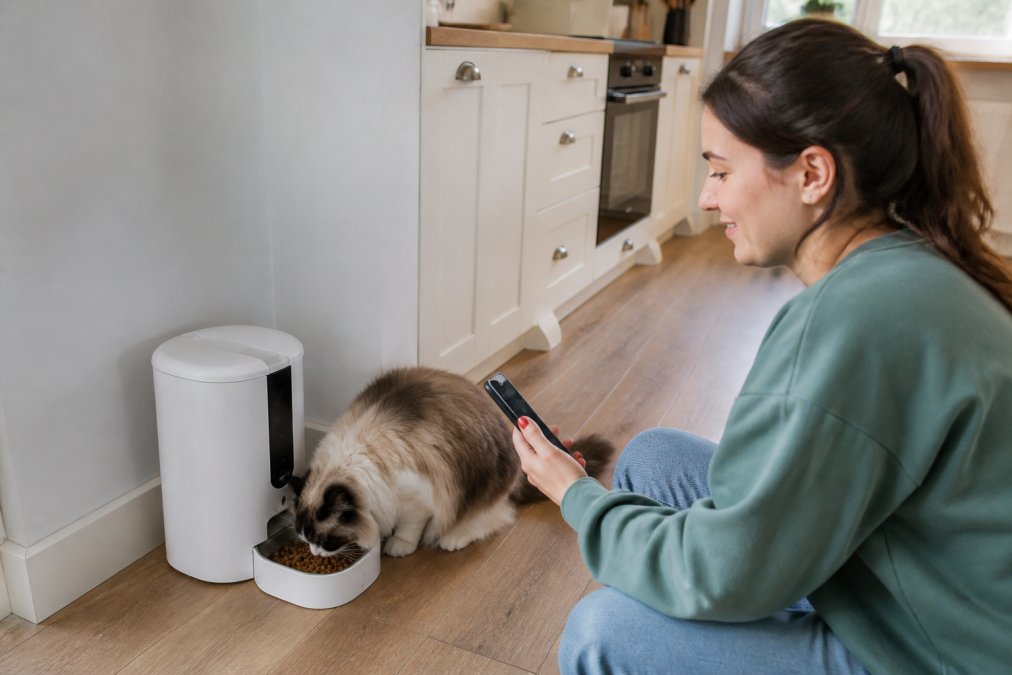
What most guides miss is the food-size constraint. The feeder works best with dry kibble between 4 and 12 mm in diameter. Larger pieces jam the auger, and the red light flashes fast to signal a stuck feeder. A common mistake is filling it with mixed wet food or oversized treats, which clogs the channel and reduces portion accuracy.
Pros: Generous 4L capacity, 10-meal scheduling, detachable parts for cleaning, dual power supply. Cons: Dry food only, 2.4GHz WiFi required, batteries sold separately.
2. Foldable 3-in-1 Wireless Charging Station: One Dock, Three Devices
Cable clutter is the quiet killer of a clean nightstand. The Foldable 3-in-1 Wireless Charging Station replaces three chargers with one folding dock that powers a phone, a smartwatch, and wireless earbuds simultaneously.

The dual-coil design solves a real annoyance: you don't have to hunt for the exact charging sweet spot. Place the phone down and it charges without the intermittent connection drops that plague cheap single-coil pads. Output tops out at 15W.
Compatibility covers iPhone 17 down through iPhone 8, plus Samsung Galaxy S25 through S10. The watch side supports Apple Watch Series 2 through 10 Ultra, but not Samsung watches. That limitation catches buyers off guard.
For fast charging, you need a QC 3.0 power adapter, which is not included. Safety features include temperature control, voltage protection, short-circuit prevention, and ventilation holes on the back.
Pros: Foldable for travel, dual-coil stability, charges three devices, anti-slip pads. Cons: QC 3.0 adapter not included, no Samsung watch support.
3. AI Chatbot Voice Assistant: A Smart Speaker That Reads the Room
A smart home ecosystem usually starts with a voice hub. The AI Chatbot Voice Assistant adds something most speakers lack: emotion recognition and genuine multilingual range.
ROJECO Automatic Cat Feeder Pet Smart →

This is a smart speaker that adjusts its responses based on tone, supports custom settings, and runs on a rechargeable battery with long battery life. Voice recognition handles natural conversation rather than rigid command phrases, and the 3.5mm audio jack lets you route sound to external speakers.
Language coverage is the standout. The device supports multilingual options. For multilingual households, that removes the friction of switching assistants.
Two versions exist. The Standard Version arrives pre-configured and works once connected to WiFi. The Custom Version ships with no AI agent or language set, aimed at DIY users who want to configure everything themselves.
Pros: Emotion recognition, extensive language support, rechargeable battery, Type-C charging. Cons: Custom Version requires manual configuration, needs WiFi for full function.
4. Smart Robot Camera: 360° Coverage for Renters and Homeowners
Renters face a specific problem: security cameras that need drilling.
Pros: 350° pan coverage, local TF card storage, AI human tracking, two-way audio. Cons: Requires a stable WiFi signal, TF card sold separately.
5. Smart WiFi Doorbell: See Who's There Without Opening the Door
The Smart WiFi Doorbell answers a simple question: who is at the door? It pairs a 1080p camera with IR night vision, capturing some snapshots stored in your app once it rings.
6. R10 Smart Ring: Health Tracking Without the Subscription
Health wearables have a subscription problem. The R10 Smart Ring tracks heart rate, blood oxygen, body temperature, pressure, and sleep patterns without locking your data behind a monthly plan.
FCC consumer guide to wireless device safety
How to Build a Smart Home Ecosystem That Doesn't Fall Apart
A smart home ecosystem is a connected set of devices that share control through common protocols and apps rather than operating as isolated islands. Building one that lasts comes down to three decisions.
| Goal | Device to Start With | Why |
|---|---|---|
| Pet care automation | ROJECO Automatic Cat Feeder | Scheduled feeding, app control |
| Desk and device charging | Foldable 3-in-1 Station | Replaces three chargers |
| Voice control hub | AI Chatbot Voice Assistant | Multilingual, emotion-aware |
| Rental-friendly security | Smart Robot Camera | No drilling, local storage |
| Entry monitoring | Smart WiFi Doorbell | Wireless, long battery |
| Health tracking | R10 Smart Ring | No subscription fees |
Frequently Asked Questions
What are the best home gadgets for 2026?
The best smart home gadgets for 2026 focus on solving specific problems rather than adding tech for its own sake. Standouts include the ROJECO Automatic Cat Feeder for scheduled pet meals, the Foldable 3-in-1 Wireless Charging Station for desk organization, and the Smart Robot Camera for renter-friendly security. Look for devices that work with your existing WiFi and do not require a monthly subscription to unlock core features.
How do I choose the right smart home devices for my lifestyle?
Start with the tasks you repeat daily: feeding pets, charging devices, checking who is at the door. Match gadgets to those routines first. Check the wireless protocol each device uses (most budget options run on 2.4GHz WiFi), confirm whether the app works on your phone, and verify there are no mandatory subscription fees. A smart home ecosystem works best when you add one or two devices at a time and test them before expanding.
Are smart home gadgets worth the investment for home automation?
They can be, if you pick devices that address real friction in your day. A $75 automatic feeder that prevents missed meals pays for itself in convenience. A $22 video doorbell gives you remote monitoring without a professional installation. The key is avoiding gadgets you will stop using after a week. Focus on devices with app-based control, real-time alerts, and local control options where available.
What should I know about smart home privacy and data security?
Check where your data is stored and whether the device supports local control. Cameras and doorbells should offer encryption for video streams and cloud-based storage with clear retention policies. The Smart Robot Camera supports TF card storage up to 128GB, which keeps footage on-device rather than in the cloud. For any WiFi device, change the default password and keep firmware-updates current to close known vulnerabilities.
Can I set up smart home gadgets in a rental without damaging walls?
Yes. Many smart home devices are designed for tool-free installation. The Smart WiFi Doorbell supports glue installation as well as screws, and the indoor chime plugs into any outlet. The Smart Robot Camera sits on a shelf or table. Wireless charging stations and smart lamps need no mounting at all. Check each product listing for installation requirements before buying, and look for adhesive options when drilling is not allowed.