

Table of Contents
- The Core Framework: Aesthetic Functionality for Stylish Tech Integrated Home Decor
- Hidden Smart Home Technology Ideas: Concealment That Works
- Best Smart Home Gadgets for Interior Design: 7 Picks That Look Good
- How to Hide Cables in Living Room: Cable Management for Smart Homes
- Budget-Friendly DIY Tech Integration for Renters
- Health and Wellness Tech That Blends With Your Decor
- Conclusion: Making Tech Integration Work for Your Space
- Frequently Asked Questions
Last Updated: September 27, 2026
The Core Framework: Aesthetic Functionality for Stylish Tech Integrated Home Decor
The best tech integrated home decor follows one rule: technology should disappear into the room, not announce itself. This guide from NextGen shows how, without gutting your walls or your budget.
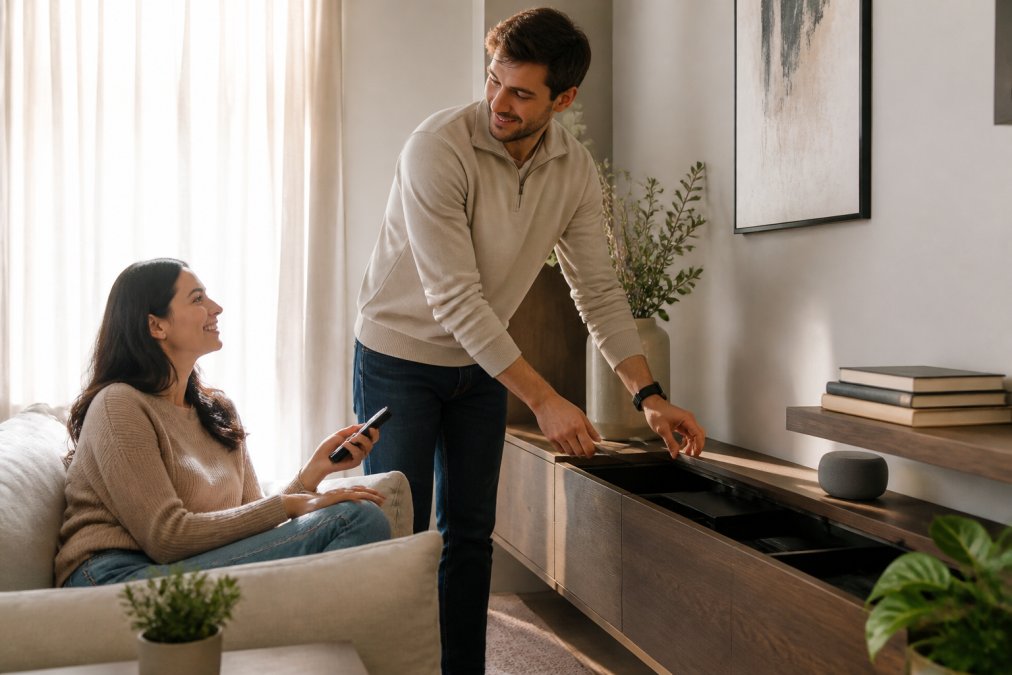
Hidden Smart Home Technology Ideas: Concealment That Works
Hidden smart home technology ideas work best when concealment is functional, not decorative: keep the device accessible for charging, airflow, and signal while removing it from view.
Three approaches cover most rooms:
- Furniture with built-in power. Console tables, nightstands, and media units increasingly ship with concealed charging pads and cable channels. Look for a routed back panel rather than a drilled hole.
- Closed storage with ventilation. A cabinet door hides a router or hub, but solid wood traps heat. Choose a unit with a slatted or perforated back.
- Surface-level camouflage. Trays, baskets, and lidded boxes absorb small devices without wall work. This is the rental-friendly option.
Retrofitting Older Homes With Modern Tech
Older homes rarely have outlets where you need them, and that's the real constraint. Work with existing power locations instead of chasing new ones: map where outlets sit in each room, then place devices within reach. Battery-powered sensors, plug-in smart plugs, and adhesive LED strips cover most needs without an electrician. New wiring is a licensed electrician's job, and many jurisdictions require a permit for added circuits.
Best Smart Home Gadgets for Interior Design: 7 Picks That Look Good
The best smart home gadgets for interior design are the ones you'd leave out even if they weren't smart. Seven that earn their space:
- Wireless charging lamps. A bedside lamp that charges your phone removes a cable and a clutter point. NextGen's G-shaped LED lamp with wireless charging and a built-in speaker handles light, sound, and charging in one object, with app-set brightness and wake-up routines.
- Sunset projector lamps. A small, warm accent light that throws color across a wall does more than a bright overhead fixture. The LED sunset lamp rotates 360 degrees and runs off USB, so it works on a desk, shelf, or power bank outdoors.
- Minimalist wall sconces. A black matte sconce reads as architecture, not gadgetry, and built-in LEDs mean no bulb changes. A two-pack of modern LED wall sconces suits hallways and bedrooms that need light without a table.
- Sculptural table lamps. The crystal egg-shaped table lamp functions as an object first and a light second, which is exactly the point.
- Paper lantern floor and table lamps. A Japanese rice paper lamp softens a corner and pairs well with smart bulbs you control by voice.
- Smart speakers in woven or fabric finishes. Choose a model whose fabric matches your sofa or curtains.
- Smart plugs behind furniture. The least glamorous pick and the most useful. They turn any existing lamp into a voice-controlled one.
| Gadget | Best For | Why It Blends |
|---|---|---|
| Wireless charging lamp | Bedside, desk | Replaces three objects with one |
| Sunset projector | Accent lighting | Small footprint, wall wash effect |
| Wall sconce pair | Hallways, bedrooms | Reads as architecture |
| Smart plug | Any existing lamp | Completely hidden |
How to Hide Cables in Living Room: Cable Management for Smart Homes
Cable management is the step most people skip, and it decides whether your setup looks designed or improvised. Treat it as the main event: fewer cables, shorter runs, nothing visible at eye level.


- Count every cable in the room and remove anything you haven't used in six months
- Group devices by outlet so one power strip serves several
- Use adhesive cable clips to run cords along the back edge of furniture, not across the floor
- Choose a media console with a routed back panel and a cable tray
- Label each cable at both ends before you bundle it
- Route cords behind baseboards where a gap already exists, never through a wall without a proper outlet box
The Four Tools That Do Most of the Work
You don't need a specialty kit. Four categories cover nearly every living room:
- Adhesive cable clips and channels. Clips hold a single cord against a surface; channels bundle several into one paintable strip that disappears against a baseboard or wall. Choose channels for three or more cords on the same path.
- Velcro-style hook-and-loop ties. Reusable and adjustable, which matters because you'll add and remove devices. Zip ties are permanent and a mistake for anything you might move.
- Under-desk and behind-furniture trays. A shallow tray mounted to the back of a console catches the power strip and slack, keeping the floor clear. This is the highest-impact upgrade for a media wall.
- In-wall cable kits with a rated faceplate. For wall-mounted TVs, a kit with two faceplates and in-wall rated cable passes power and signal through the wall cavity cleanly. This is the owner's answer, not the renter's.
Match the Method to Your Situation
| Situation | Best Method | Why |
|---|---|---|
| Renting, can't drill | Adhesive clips and channels | Lifts off without damaging paint |
| Own the home, wall-mounted TV | In-wall kit with rated faceplate | Cleanest long-term result |
| Media console with many devices | Behind-furniture tray plus hook-and-loop ties | Contains the power strip and slack |
| Single lamp or charger | Adhesive clip along furniture edge | Fastest fix, no tools |
The Mistakes That Undo the Work
- Running power and low-voltage signal cables in the same bundle for a long distance. Keep them separated where you can; it reduces the chance of interference on audio and video runs.
- Stuffing a power strip into a closed drawer. Heat builds up and there's no airflow. If you must enclose it, choose a ventilated box.
- Routing a cord through a wall without a faceplate or outlet box. That's a code and safety issue, not just a looks issue.
- Forgetting the cable you'll add later. Leave a pull string or a little slack in every channel so the next device doesn't force you to start over.
Where the Cables Should Actually End Up
The finished room has no visible cord at eye level: power strips live in trays behind furniture, charging happens on a surface rather than from an outlet across the room, and the one cable you can't hide, wall to console, gets a channel matching the wall color. Then the room reads as furniture, not wiring.
Budget-Friendly DIY Tech Integration for Renters
Renters face a specific constraint: no drilling, no new outlets, no permanent changes. That rules out in-wall anything, but not a smart home.
Health and Wellness Tech That Blends With Your Decor
Wellness devices have a design problem: the ones that work best often look most clinical. The real opportunity is treating wellness tech as decor from the start, choosing devices that already look like furniture and placing them where you'll actually use them.
Circadian Lighting, Without a Lab Look
Light is the easiest place to start because it's already part of your decor. Tunable, dimmable lamps shift from bright, cooler task lighting in the morning to warm, dim light in the evening, the mechanism is color temperature: higher Kelvin in the morning, lower after sunset. A lamp with app control covers color, brightness, and a customizable wake-up sequence, so one object serves morning and night.
Air Quality You Can See and Style
Air quality monitors and purifiers are the category most likely to look like medical equipment. Two fixes work. Choose a monitor with a neutral finish and small footprint, placed on a shelf or console where it reads as an object rather than a device. If you run a purifier, match its form factor to the room: a tower in a corner, a tabletop unit on a sideboard.
New Intelligent G Shaped LED Lamp →
Biophilic Tech: Plants, Light, and Sound
Biophilic design, bringing natural elements indoors, pairs naturally with wellness tech. Grow lights let you keep real plants in low-light corners, and a full-spectrum bulb in a simple fixture hides the technology inside a normal lamp. White noise machines and sunrise alarms follow the same logic: shelf placement, neutral finishes, decor-like looks. A sunrise alarm replaces the harsh phone alarm with a gradual light cue and looks like a small clock, not a medical device.
The Placement Rule That Decides Everything
Placement matters more than the device. A wellness gadget on a nightstand gets used; the same gadget in a drawer does not. Put the air monitor where you'll glance at it, the white noise machine within arm's reach of the bed, and the grow light where the plant lives. If a device must be retrieved from a cabinet to work, it won't.
A Simple Wellness Corner
You don't need a dedicated room. One corner can hold a tunable lamp, a small air monitor, a white noise machine, and a plant under a grow bulb, four objects that look like decor and each do a job. That's the idea: wellness tech that disappears into the room like the rest of your tech.
Conclusion: Making Tech Integration Work for Your Space
The hard part isn't buying smart devices, it's resisting the urge to buy all of them at once and then wondering why the room feels crowded. Pick one anchor object per room, hide everything with a cable, and let the rest follow. If you'd rather not plan the whole layout yourself, an AI Studio can help you visualize how a lamp, sconce, or charging station will sit in a room before you commit to buying it.
Frequently Asked Questions
How can I hide technology in my home decor?
Start with cable management: use raceways, adhesive clips, and cord organizers to route wires along baseboards or behind furniture. For devices, choose furniture with built-in charging stations or use decorative boxes with ventilation cutouts. Wall-mounted smart displays can be framed like art, and speakers can sit on bookshelves. The goal is to make tech look intentional, not accidental. NextGen's G-shaped LED lamp doubles as a wireless charger and Bluetooth speaker, so it replaces three devices with one stylish object.
What are the best smart home gadgets that look stylish?
Look for devices with clean lines, neutral colors, and multi-function designs. The New Intelligent G Shaped LED Lamp from NextGen combines a 15W wireless charger, Bluetooth speaker, and dimmable mood light in one sculptural piece. The 28 2-Pack Modern LED Wall Sconce offers minimalist black matte fixtures that provide two-way lighting and energy-efficient LEDs. The LED Sunset Lamp projects a warm glow and rotates 360 degrees, adding ambiance without visual clutter.
How do I balance modern technology with minimalist interior design?
Choose tech that serves multiple purposes to reduce the number of visible devices. For example, a smart lamp that also charges your phone and plays music eliminates the need for separate gadgets. Use concealed cable management and pick products with simple shapes and neutral colors. The Japanese Design Akari Noguchi Yong Table Lamp is a good example: it's a handcrafted rice paper lamp that looks like art but provides warm LED lighting. Keep surfaces clear and let one or two statement pieces stand out.
Can smart home technology improve the aesthetics of a room?
Yes, when integrated thoughtfully. Smart lighting like the Italian Designer Table Lamp (crystal egg-shaped) adds a sculptural element while providing soft illumination. Automated window treatments and smart climate control can reduce visual clutter from cords and manual controls. The key is choosing devices that enhance the room's design rather than distract from it. NextGen's collection focuses on pieces that look good and work hard, so your space feels curated, not cluttered.
What are some budget-friendly ways to integrate tech into home decor?
Start with small, impactful upgrades. The LED Sunset Lamp at $15 adds ambient lighting and doubles as a photography prop. The Italian Designer Table Lamp is $10 and brings a designer look to a bedside table. Use adhesive cable clips and cord covers to hide wires without drilling. For renters, plug-in smart plugs and battery-powered LED strips require no installation. NextGen offers several affordable options that don't sacrifice style for function.
Will these smart home products work in a rental apartment without damaging walls?
Many do. Choose plug-in devices and adhesive mounts instead of hardwired fixtures. The New Intelligent G Shaped LED Lamp sits on a table and requires only a standard outlet. The LED Sunset Lamp uses USB power, so you can plug it into a laptop or power bank. For wall sconces like the 28 2-Pack Modern LED Wall Sconce, you can use removable adhesive hooks if drilling isn't allowed, though the fixture itself is designed for standard installation. Always check your lease before mounting anything.
The challenge with tech integrated home decor is that every new device adds another cable, another plug, and another blinking light. NextGen solves that by stocking pieces that combine functions, like the G-shaped lamp with 15W wireless charging, Bluetooth audio, and app-controlled lighting, plus a rotating sunset projector and minimalist LED sconces that install without professional tools. Get started with NextGen and build a home where the tech disappears and the room does the talking.